Go to Blogger edit html and find these sentences.Now replace these sentences with your own descriptions.This theme is Bloggerized by Lasantha Bandara - Premiumbloggertemplates.com.
Go to Blogger edit html and find these sentences.Now replace these sentences with your own descriptions.This theme is Bloggerized by Lasantha Bandara - Premiumbloggertemplates.com.
Go to Blogger edit html and find these sentences.Now replace these sentences with your own descriptions.This theme is Bloggerized by Lasantha Bandara - Premiumbloggertemplates.com.
Go to Blogger edit html and find these sentences.Now replace these sentences with your own descriptions.This theme is Bloggerized by Lasantha Bandara - Premiumbloggertemplates.com.
Go to Blogger edit html and find these sentences.Now replace these sentences with your own descriptions.This theme is Bloggerized by Lasantha Bandara - Premiumbloggertemplates.com.
Showing posts with label Graphic and Design. Show all posts
Showing posts with label Graphic and Design. Show all posts
Ashampoo � Photo Commander 10 | Digital cameras have revolutionised photography, but the downside is that most hard drives are now cluttered up with thousands of photos, and keeping track of them all can be a nightmare. Add to that the fact that many imperfect photos can be improved with the right software and you�re left wondering how to manage it all.
In the past you�d have one program for managing your photos, and another for editing them. These days, though, an increasing number of programs � Ashampoo Photo Commander among them � aim to provide a one-stop shop for organising and fixing all of the images on your computer.
The program splits its feature set into five sections: Common, Quick-Fix, Edit, Create and Organize. All the photo management tools are found under Organize, including batch processing and renaming, duplicate finder and tools for rotating and optimising JPEG files without affecting the quality. Unlike tools like Windows Live Photo Gallery and Picasa, the program doesn�t attempt to catalogue all your pictures; instead, you select photos from your hard drive, or create albums into which you drag and drop a group of photos for easy access in future.
The Quick Fix section enables you to easily and swiftly correct problems like lighting with a single click. It also contains a number of filters, effects and other quick edits. Switch to the Edit tab for more extensive editing controls, or select Create to generate slideshows, collages, calendars, contact sheets and more.
This is the brand new Ashampoo Photo Commander 10. New features/additions include:
Faster program startup and less memory consumption
Photo import from digital cameras and improved support for RAW formats
Upload photos or complete photo albums to Facebook/YouTube/Picasa/etc.
Optimized and extended 1-click photo optimization
New photo tools, e.g. Repair Tool or Focus Effect Tool
Improved image adjustment with a new gradation curve tool, histogram and improved controls
Improved support for color profiles in JPG files and support for the Google image format WebP
Verdict:
Ashampoo Photo Commander may seem overpriced compared to free software like Google Picasa, but it does at least offer plenty of tools and features missing from the freebies.
Creating and editing HD videos with 3D effects was, not so long ago, something that only the big studios and entire teams of professionals could successfully do. Well, not anymore! Your home computer can now be turned into an editing studio, powered by one of the best producers out there: Sony's Vegas Movie Studio HD Platinum.
BAHASA INDONESIA
Sony movie studio platinum 12.0 suite ini adala software buatan sony creative software yang lengkap berfungsi untuk mengedit video dan audio dengan hasil yang bagus. Mungkin pembaca setia BLUE software pernah juga menggunakan sony vegas. Sony movie studio platinum ini juga sama-sama buatan sony seperti sony vegas dan seperti yang temen temen blue software tahu kalau software keluaran sony bagus-bagus dan bisa diandalkan.
screenshot
Sony Vegas Movie Studio HD Platinum will be your guide into the attractive world of movie creation. Professional to the bone, this software really brings great value for the price and earns one of the top places on the recommendation list.
Requirements:
2 GHz processor (multicore or multiprocessor CPU recommended for HD or stereoscopic 3D)
400 MB hard-disk space for program installation
Windows-compatible sound card
DVD-ROM drive (for installation from a DVD only)
Supported CD-recordable drive (for CD burning only)
1 GB RAM (2 GB recommended)
OHCI-compatible IEEE-1394DV card (for DV capture and print-to-tape)
USB 2.0 connection (for importing from AVCHD or DVD camcorders)
Supported DVD-R/-RW/+R/+RW (for DVD burning only)
Supported BD-R/-RE drive (for Blu-ray Disc burning only)
Canvas� 14 with GIS+ is the only GIS data visualization solution in today�s market that addresses the need of GIS professionals to communicate the results of their research analysis � quickly, accurately, and effectively � inside a true graphics application. Canvas 14 with GIS+ is loaded with new tools to provide greater control over technical illustrations, enable more powerful publishing and collaboration, and streamline overall workflows. Simply import GIS project information and use Canvas 14�s powerful vector object illustration and advanced raster image editing tools to assemble, annotate and enhance your data � in one integrated, flexible design environment. Speed up and streamline your workflow from initial import and design to final presentation, facilitate collaboration, and improve overall productivity with the complete technical illustration and GIS data visualization solution.
BAHASA INDONESIA
Merupakan software desain grafis teknis dan umum, imaging, dan penerbitan (cetak dan web) yang di produksi oleh ACD Systems. ACD System Canvas 14 with GIS merupakan paket khusus dari software desain ACDSee yang di bandrol dengan harga $799.99 USD. Di dalam software ini tersedia semua keperluan anda untuk menciptakan / membuat dan mengedit grafik vektor dan juga raster. Dengan menggunakan Canvas 14 Anda dapat menambahkan efek ke ilustrasi, teks dan berbagai grafik, menggunakan tools built-in gambar dan fasilitas editing, menyesuaikan kecerahan, kontras dan saturasi, mengubah transparansi setiap objek, dan masih banyak lagi. Software ini sangat cocok digunakan untuk pembuatan ilustrasi, pengeditan tata letak halaman, animasi, presentasi, dan publikasi dalam format cetak dan Web.
Features
Handle it all � including GIS file formats
Canvas 12 with GIS+ can handle all your data import needs. In addition to the 100+ file formats, including DXF, DWG, CGM, Adobe�1 PDF, and RAW that comes standard in Canvas 12, the GIS+ module supports 18 GIS specialized file types, such as SHAPE, MapInfo and ARC/INFO. Augment, apply effects, and export to another format. You can even export to multiple formats simultaneously.
Work flexibly with vector objects
Illustrate, edit and augment all forms of complex visual objects with Canvas 12's wide variety of professional tools and powerful Sprite technology. New features allow you to rejoin segment objects into one and fill the intersections of overlapping objects with a single click, while its proprietary SpriteLayers and SpriteEffects can be used to apply image and transparency effects without affecting the original object.
Access raster image editing tools
Why work within limits? Canvas 12 comes complete with a full suite of raster image editing features. Create, edit and augment raster images with a host of industry standard and specialized techniques, tools and filters. Design image compositions, retouch photos, paint and color-correct scanned images, create transparency effects and vignettes, age photos, clone pixels and much more. Work with both raster images and vector images at the same time, with access to the same tools, to enhance objects and images in countless ways, all in a georeferenced environment.
Draw and dimension with precision
Create visuals from both raw and technical data. Choose from a variety of methods to input your exact coordinates, and Canvas 12, with its ability to represent any object property to within .035 microns, accurately turns your data into strong, real-time visual content that you can then enhance, review and publish. Resize and scale objects, add fill and stroke inks, widths and other attributes, and draw shapes � all with measured precision and placement.
Add on-the-fly illustration objects
Instantly add re-usable dynamic objects to your georeferenced work. Access hundreds of commonly used and specialized technical symbols from Canvas 12's pre-loaded Symbol Library collection, or create your own custom symbols using any vector, text or composite object. You can also create custom symbol links and pen strokes, and manage them all with flexibility. Move, add keywords, and re-categorize symbols to match your unique workflow needs.
Make the most of your GIS data
Apply a host of image filters, transparency effects, annotation tools, image warping techniques, in addition to visual analysis and symbology tools, to create an easy-to-understand representation of your georeferenced work.
Integrate into seismic and petrochemical workflows
Canvas 12 with GIS+ fully supports CGM*PIP files, helping increase productivity and streamline seismic-related workflows. Its CGM*PIP Import filter has received acclaim for its ability to successfully work with files from UNIX-based seismic interpretation applications. You can also import raw seismic visual data, augment, annotate, color and edit it numerically, and then combine the results with professionally formatted text in a multi-page document ready for sharing � all in a single environment. Throughout the process, illustrations and documentation retain the high level of accuracy demanded by professionals within the seismic and petrochemical industries.
Say goodbye to distractions
Since the GIS+ module is integrated within Canvas 12, you benefit from all of its intuitive interface and customizable tool and menu options designed to make it easy to find what you need. Enjoy one stop access to inks and styles, organize your workspace to maximize productivity, and work faster with shortcuts, smart toolboxes, and interface enhancements.
Publish your GIS data professionally
Create great-looking publications and presentations of your GIS data, in collaboration with colleagues. Canvas 12 has everything needed to design professional documents and presentations, including the Symbol Library and pre-installed Canvas symbol sets, top quality raster image rendering, robust page and text formatting, flowchart integration, and a host of pre-press tools. Apply password and encryption protection, and share your enhanced GIS data in a variety of print and Web-ready presentation formats, including HTML and Adobe� PDF complete with interactive hyperlinks.
No need to be worried about formats, frame rate or file sizes, the functions of video join, split and cut can be easily achieved by Gilisoft Video Editor. The video editing software allows you to edit video files in various formats like AVI, MPEG, H.264, SWF, MOV, WMV, etc. for playback on popular devices like iPod, iPhone, PSP, PS3, and so on. The three processes, video join, split and cut, can run in background without too much space occupation. As a video joiner, splitter and cutter, Gilisoft Video Editor has an intuitive interface and makes it easy to turn original videos into works of art. And also you can watch the video in the preview window. Gilisoft Video Editor is well worthy of having a try.
BAHASA INDONESIA
Merupakan software video editor yang serba bisa. Dengan software ini anda dapat memecah (split), menggabungkan (joiner), memotong bagian tertentu pada video anda (cutter), menambahkan subtitle pada video, memberikan watermark dan menambahkan effek pada video-video anda. GiliSoft Video Editor juga memiliki tampilan antar muka yang sangat user friendly serta ringan dan cepat dalam pengerjaan pengeditan video.
Key features include: Join multiple videos and combine them into one Split one video into several segments Cut off the unwanted segments of your video Crop off the unwanted regions of your video Add subtitle and watermark to your video
PHP Report Maker is a powerful reporting tool that can generate dynamic PHP Web reports from MySQL, PostgreSQL, Microsoft Access, Microsoft SQL Server and Oracle database. You can instantly create live detail and summary reports or crosstabs reports for your Websites. Flash chart (column, bar, line, pie, area, doughnut, funnel, multi-series, stacked charts, Candlestick and Gantt) and JavaScript (HTML 5) chart are also supported. PHP Report Maker is designed for high flexibility, numerous options enable you to generate the reports that best suits your needs. The generated codes are clean and easy-to-customize. The PHP scripts can be run on Windows servers (MySQL/PostgreSQL/Access/MSSQL/Oracle) or Linux/Unix servers (MySQL/PostgreSQL/Oracle). PHP Report Maker can save you tons of time and is suitable for both beginners and experienced developers alike.
Features PHP Report Maker v6 Export to PDF with Charts Supports exporting report to PDF with charts. (Requires Flash support in browsers and FusionCharts extension for registered users.)
Export to Native Excel Spreadsheet with Charts Supports exporting report to native Excel file (.xls or .xlsx) with charts as image. (Requires Flash support in browsers, PHPExcel and FusionCharts extension for registered users.)
Dynamic Selection List for Extended Filters Parent/Child selection in Extended Filters
Searching Comma Separated Values with Extended Filters Search comma separated values (e.g. "Red,Blue,Gray") with checkboxes or select-multiple selection list
Ajax Popup Filter Popup filters are now loaded by Ajax. Page initial loading time greatly reduced for reports with multiple popup filters or with large number of distinct values in the popup filter.
Page Breaks for Printing Page size setting for export. Insert page breaks to exported document for better printing.
Menu for Mobile Devices Automatically detect mobile devices and use mobile menu to spare more space for content. HTML5 charts will also be used for mobile devices for better compatibility.
More Server Events Page_Selecting - customize the filter to change the records to be selected for the report Page_Filtering - customize the WHERE clause built from the filter and/or Extended Filters UserID_Filtering - modify, replace or add filter so the user can access more or less records allowed by User ID Security Page_Breaking - customize page break during export
Many More Updated DOMPDF (0.6.0 beta 3) extension (reduced rendering time) Updated FusionCharts (FusionCharts XT v3.2.2 SR5) extension (for registered users only) Allow different chart renderers (Flash/HTML5) for charts in the same page Sort order and filter clause for Extended Filters Allow login by URL Option to generate scripts without header and footer Expand/Collapse filter panel automatically (if "Initiate filter panel collapsed" enabled) Locale settings in language file Email with TLS/SSL Export to email with charts as embedded images Improved filter panel default values Improved compact summary only view Summary report without grouping fields Option to skip null and zero values when calculating summary values Visible property of field object (for use with server events to show/hide fields) Faster code generation by JScript engine IIS Express as testing server jQuery library included Various other minor improvements
RonyaSoft Poster Designer is a software program for quick and easy design and printing of attractive custom posters, banners and signs. The software is shipped with a collection of ready-to-use poster templates. Alternatively, you can create posters from scratch or design your own poster templates for further use. Posters and banners may be printed directly on a home or office printer, exported to an image files to be printed by a print service provider, or used in the Internet (myspace, livejournal, flickr, etc.). Use an extra add-on (RonyaSoft Poster Printer) to print posters, banners and signs in big-size multipage format.
screenshot
Features
WYSIWYG (what you see is what you get) object editor
Adobe Photoshop CS5 Micro Edition Full | Photoshop CS5 is certainly not a new software design buatanda lover but if photoshop cs5 v12 micro edition (adobe white rabbit) there must also be the uninitiated.
Adobe Photoshop CS5 v12 micro edition (adobe white rabbit) is one of the flagship software of adobe which serves as a photo editor or grafhic design.
As the name suggests, adobe photoshop cs5 micro edition (adobe white rabbit) is a micro version of a size smaller than it should be and there is no other additional applications such as image ready, drive adobe, adobe bridge and the other or can be called only photoshop cs5 only, but not reducing features of photoshop itself.
For the lovers of photoshop but hard to download because the file is usually very large sizenya, please download the micro to the very small size but same quality on the link below.
Photoinstrument 5.5 Full | This time sofwergratis will share photo editing software for all of you. photo editing software that one can also called for a makeup photo software to make it better.
Maybe friend sofergratis better understand how to use it than me because I was still many shortcomings.
for sofwergratis friends who have never used it, do not worry because before the editing process began sofwergratis companions will be given a tutorial how to use PhotoInstrument when you first run it.
Software called PhotoInstrument is very easy to use even for beginners though.
Home Plan PRO 5.2.26.1 | Home Plan Pro is designed to quickly and easily draw high quality floor plans, site plans, and architectural designs. Home Plan Pro provides a full array of graphic tool buttons to let you easily pick a tool or action. Once you choose a tool, Home Plan Pro tells you how to use it. You may use the mouse or keyboard, or both, to create your plan.Home Plan Pro gives you many choices for printing your plans. You may select a specific scale, or elect to have your plan printed at the largest size that will fit on the paper you select. While there are a number of impressive and powerful CAD programs available, they are more difficult to learn and use than Home Plan Pro. To preserve its intuitive ease of use and low cost, Home Plan Pro is not designed to compete with full-fledged CAD programs.
SCREENSHOT :
Features
Home Plan Pro includes the home design tools you need:
Easily draw arcs, rectangles, circles, lines, and so forth.
Use the mouse, keyboard, or a combination of both.
Add scaled dimensions with two clicks.
Insert doors and windows with equal ease.
Zoom in or out with a click to work on detailed parts of the plan or to see the whole of it.
Create Layers that you can make invisible or visible at a click
Draw a plot plan using metes & bounds. Calculate the area and acreage.
KVIS Refocus v.2.0 Multilingual and Trial Reseter | Many times when we take pictures using a digital camera shots with the composition of the result is very interesting, but the detail drawing that produced no clear and very blur / blur. Because time may not be played back and Momennya place just like that, would re-do the composition is highly unlikely. So is there a solution? how? Of course there is a solution that is by using software to fix it, and refocus v2.0 AKVIS is one of them. This software can improve the sharpness of image blur, and allows us to increase the sharpness in a particular area is also obscured in any part of the other. Its use is easy and can be done by anyone, even a novice photographer once.
Screenshot
(if the difference between two pictures above do not seem obvious, its Image Zoom to see more clearly the differences of the two images above)
What's New ?
Added compatibility of the plugin with Adobe Photoshop CS6 and Photoshop Elements 11.
Improved compatibility of the plugin with Corel PSP X4.
Fixed bug when working with certain color profiles.
Improved RAW processing.
Added support for images from Sony cameras SLT-A35, SLT-A65V, NEX-5N, and Panasonic camera DMC-GX1.
Improved the Print dialog (when no printers are installed).
ActiveFax Server v4.31 Build 0225 | Fax machine is a replacement software that allows you to receive, send and forward fax messages via email. ActiveFax Server will automatically detect and configure the hardware on your pc, and after installation of the fax server is ready to be operated. In addition ActiveFax Server can be installed many modems at once, that can also handle a lot of fax line as well.
Screenshot
Features
Terminal Server and Citrix support
Complete client/server architecture
Centralized data storage on the fax server
Data access from every workplace in the network
Sophisticated user, group and security concept
Support of all common fax modems (fax class 1, 1.0, 2 and 2.0), ISDN adapters and Brooktrout/Cantata and Intel/Dialogic fax boards (list of recommended modems)
Support of V.34 Fax (Super G3) for transfer rates of up to 33,600 bps
Support of VoIP/FoIP (Voice over IP/Fax over IP) with Eicon "Diva Server SoftIP" software
Unlimited number of fax lines (modems)
Free technical support and software updates available for free download
Faxing and emailing from any Windows application through native printer driver
Faxing and emailing from UNIX and Linux through LPD/LPR, FTP, TFTP and RAW-TCP-Port connections as well as import from the file system
Automatic routing of received fax messages with extension numbers (DDI, MSN, DID), station id (CSID) and line routing
Automatic printing of received fax messages and sending reports on different printers per user
Automatic forwarding of fax messages by email, also to multiple email addresses
Automatic export of fax messages
Support of the file formats PDF, Tiff, Multipage Tiff, GIF and BMP for email attachments and document export
Automatic definition of fax parameters (fax number, subject, priority, etc.) for fully automated fax messages from own applications through data fields
Formatting of fax messages from non-Windows operating systems with printer commands of HP-LaserJet (PCL), Epson-LQ, Postscript and PDF
Automatic archiving of fax messages
Central and private phone books
Direct access to Outlook and Exchange address books
Cover pages and overlays
Data exchange with external database tables through ODBC
Fax on Demand server and client (fax polling)
Least Cost Routing and automatic delayed fax transmissions
Email transmission through SMTP with direct Internet connections or RAS dialup connections
Support of HP Digital Sender 9100C and Xerox Workcentre series
Economical utilization of available resources for low hardware requirements
Automatic hardware detection and configuration by the setup program
Requirements
Processor: 80486 / 66 MHz (Pentium / 300 MHz or more recommended)
RAM: 64MB (256 or more recommended)
Free disk space: 80 MB (200 MB or more recommended)
Wedding Album Maker Gold 3.50 Full Version download - With this Wedding Album Maker program you will be able to easily create digital photo album wedding. Despite its name, Wedding Album Maker, but you also can use this software to create digital photo albums out of the theme of the wedding photos. To find out what can be done in this software, you can see the info on the features of Wedding Album Maker Gold 3.5 below.
No Experience Necessary
Wedding Album Maker is simply the easiest to use slideshow software. It is designed to be easy enough for anyone in the family to use. You can create dynamic wedding slideshows with just clicks.
All-in-One Wedding Photo Album Maker
There's no need for other CD or DVD burning software. Wedding Album Maker can do all from the beginning to the end to make a DVD slideshow. And, the whole steps are simple, fast and robust: the Burn-Proof (TM) technique which makes the DVD burning procedure more robust than ever!
Lovely Music, Transition Effects
Burn your slideshow with DVD motion menus and transition effects to DVD and watch it on TV using your DVD player. The slideshow editor includes all the tools you need to create eye-catching photo presentations. Wedding Album Maker enables you to add your favorite wedding music for your wedding slide show.
Sceenshot:
Highest Resolution Format On TV
Wedding Album Maker optimizes your digital photo and uses the Highest Resolution format which is supported by most DVD players. This technique makes photo look great on TV.
Professional Hollywood-style DVD Menu Templates
Wedding Album Maker features a library of professionally designed menu backgrounds and frames. Ranging from playful to professional, you're sure to find a background for any occasion.
Decorate Wedding Photos with Text and Arc Clips
The built-in What You See is What You Get photo editor makes it easy to add your own comments for your wedding photos. The position, font, color and shadow of the text are immediately shown with the photo.
Nik Software HDR Efex Pro 2.0.0 | Is one Adobe Photoshop plug-in designed to help professional and amateur photographers to quickly and easily to reach the full spectrum of enhancements HDR (High Dynamic Range). Nik Software HDR Efex Pro 2.0.0 Full Version provides a wide range of options, including one-click visual style presets, as well as global adjustments such as exposure, contrast, contrast structures for fine detail, and other recent HDR option. This feature makes use of four tone mapping algorithm, which allows the HDR "looks" infinite can be tailored to a particular style in HDR photography.
Screenshot :
Key Features HDR Efex Pro
Intuitive interface, with easy to understand photographic terminology and the actual processed results always displayed
U Point powered selective tools for fast, precise enhancements of contrast, shadow, structure, saturation adjustments, and more
Multiple proprietary tone mapping algorithms enabling a wide range of HDR styles
Visual presets that produce amazing results in a single-click
Ability to create the HDR look from a single exposure
Advanced technology for automatic image alignment and reduction of subject motion artifacts known as �ghosts�
All-in-one 32-bit color workflow enabling the creation of professional HDR images
Key New Features HDR Efex Pro 2.0.0
NEW: Improved Tone Mapping Engine � Develop superior results with better color rendering and improved natural styles
UPDATED: Interface, Interaction, and Workflow � Benefit from improvements to the merging interface, tone mapping and enhancement controls, visual presets, and more
NEW: Depth Control � Enjoy added depth and realism in images and helps with the new and proprietary Depth control, which helps counteract the flattened look commonly associated with HDR images
NEW: Full GPU Processing and Multi-Core Optimization � Gain even faster performance with GPU processing that takes full advantage of the processors found on modern display adapters
UPDATED: Ghost Reduction � Improved ghost reduction algorithm ensures that artifacts created by moving objects are removed with a single click
NEW: Chromatic Aberration Reduction � Reduce color fringes around objects
NEW: Graduated Neutral Density Control � Access the full 32-bit depth of the merged image, providing a natural effect especially on images with a strong horizon line
� NEW: Full White Balance Control � Take full advantage of the white balance in an image with a new Tint slider, which along with the Temperature slider, can be applied both globally as well as selectively using U Point technology
NEW: History Browser � Easily review adjustments and different HDR looks via the History Browser which records every enhancement used in an editing session
NEW: Extended Language Support � International users benefit by the addition of Brazilian Portuguese and Chinese (Simplified and Traditional) to a list of languages that includes English, French, Spanish, German, Italian, and Japanese
System Requirements
Windows Vista� and Windows 7 (32-bit and 64-bit compatible)
COREL DRAW X6 Full Version | Make friends who would like to make a design must have been familiar with this program is one COREL DRAW X6. As usual every year there will be a new version of Vector Processing Program COREL DRAW. after success in the current version of the X5 was launched version of the X6. Screenshot :
The following information for the specification of the installation COREL DRAW X6 :
Microsoft Windows� 7 (32-bit or 64-bit Editions) , Windows Vista� (32-bit or 64-bit Editions), or Windows� XP (32-bit), all with latest service packs installed Intel� Pentium� 4, AMD Athlon� 64 or AMD Opteron� 1GB RAM 1.5GB hard disk space (for typical installation without content - additional disk space is required during installation) Mouse or tablet 1024 x 768 screen resolution DVD driveMicrosoft� Internet Explorer� 7 or higher
Aurora 3D Animation Maker 12.07.23 | Software design is an image that you can use to create text, 3D animation and logo icon. Aurora 3D Animation Maker gave full support to its users to create their own 3D animated works very easily and quickly. Supported by various exciting features that have not in other similar programs, Aurora 3D Animation Maker to be the best in its class.
Screenshot
Features
Key-Frame Animation
Using just a single timeline, you will be able to control all aspects of your animation, including the length, playback speed, and more.
internal Animation Style
Every object can have many types of animations, such as rotate, swing, beat, wave, fade, typewriter, pulse.
Animation Templates
Get a lot of 3D title and logo templates. Make you own 3D title animation in minutes for web and movie. Don�t need the basic of 3D Design.
Quick Styles
You can change an object�s appearance quickly, just select the object and click the styles color button. You can get your results quickly.
3D Graphic Mode
Changing the graphic mode can quickly change the style of your design. You have Borders, Board, Buttons, 2D and 3D Text.
Graphic Library
Add a shape from the SVG shape library, text shape library, or from the toolbox. There are as many as four thousand shapes in the library.
Color and Texture
Select different parts of an object and change the color.
Supports dynamic texture, let the texture move, rotate and scale automatically on the object.
Distort Effects
Shape and text can have many types of distortions, such as sector, curve, arch, heave, sunken, wave.
Light Control
Full control of light settings.
Export Image
Export designs as PNG, JPG, Tiff, BMP, GIF, TGA files, which can be imported and edited in other illustration applications.
Particles Effects
You will have a more splendid scene effects, such as space radiation, rain, snow, fireworks, smoke, etc., with these, you are free to improve the scenes, when you need to attract the eye.
3D Manipulator
Drag the button at the right-bottom of an object, and you can extrude the text or shape.
You can control the object position, rotate and scale at X/Y/Z.
Free-Hand Shape
Create your shape easily. Use the freehand shape tool, to edit your shape. You can import an .SVG file to the canvas and edit the nodes of the shape.
SVG & Picture Import
You can import a 2D shape such as an .SVG file, and you can also import the SVG file to the freehand canvas and edit it.
You can import picture to the software and change to 3D Effect.
Shape Switch
Change an object�s shape. Just select the shape and select another shape on the panel. You can edit the shape detail by editing the properties.
Text Edit
Full control of the text. Every text can use a different format and colors.
Bevel Effects
Change the bevel effect for shape and text separately.
Dynamic Background
Supports dynamic background, let the background move, rotate and scale automatically.
Set Render Size
You can set the size of preview and export.
Export Animation
Export Animation to Movie, GIF animation or Image Sequence as you like.Which can be imported and edited in other video edit applications.
Blue Software | Xara Photo And Graphic Designer MX 8.1.1.22437 | Is a graphic design software that can be used to assist us in making professional-quality graphic design as well as a very revolutionary image editing. With Xara Photo & Graphic Designer 8.1.1.22437 Full Version MX we can create graphics for various purposes: web graphics, vector graphics, photo-composition, Flash animation and much more.
Screenshot
Features
Productivity & Interface
Xara Designer is famous for its speed and unrivalled ease of use, making it not just a highly productive tool, but a pleasure to be creative.
Speed
Xara Designer has the world's most sophisticated, highest performance vector rendering engine. Quite simply this makes it the fastest graphics software to be found.
Direct Action Tools
Xara Designer's Direct Action Tools allow you to create effects such as transparency, shadows, bevels or gradient fills in an interactive, fast and intuitive way. No distracting dialogs - simply drag on the object!
Drag and Drop
Many tasks in Xara Designer benefit from being able to use the drag and drop principle, which is the most intuitive way of working and a great time saver. It also supports drag and drop import of files, such as photos.
Solid Object Editing
Instead of dragging outlines when you draw, move, rotate or resize objects, Designer offers solid live object manipulation. Only Designer is fast enough to do this on complex vector graphics.
Undo / Redo
Being able to change what you have done is vital in a graphics package. Xara Designer allows unlimited undo, making experimentation easy.
Zoom
- The Zoom tool allows magnification up to 25,000%, perfect for detailed work. And it's super-fast and resolution independent too.
- If this image was created in Photoshop with the same detail, the file would be 2000 x 3000 inches, take hundreds of megabytes of memory and file space. As a vector design it takes just 180Kbytes!
Anti-Aliasing
Xara introduced the world's first vector anti-aliasing to bring maximum screen quality and is still a pioneer with the fastest, highest quality anti-aliasing available in any drawing program.
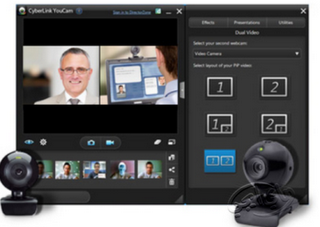
CyberLink YouCam Deluxe v5 | Is a webcam software that will maximize your laptop's webcam camera in taking pictures or recording video directly through your laptop screen. In the Deluxe v5 Cracked CyberLink YouCam also a wide range of effects that can be used to enhance and beautify the results of your webcam.
Screenshot :
Minimum System
OS : Windows XP, Vista, 7 (windows 7 tesed by me)
Processor : Intel Pentium Dual-Core 1.8 Ghz atau lebih tinggi
Microsoft� Windows� XP* with Service Pack 3 or Windows 7 with Service Pack 1
1GB of RAM
1GB of available hard-disk space for installation; additional free space required during installation (cannot install on removable flash storage devices)
1024x768 display (1280x800 recommended) with 16-bit color and 512MB of VRAM
OpenGL 2.0�capable system
DVD-ROM drive
This software will not operate without activation. Broadband Internet connection and registration are required for software activation, validation of subscriptions, and access to online services.� Phone activation is not available.
3D features and some GPU-enabled features are not supported on Windows XP.
Arabic and Hebrew supported in a Middle Eastern version with full right-to-left language support, Arab/Hebrew features, and an English interface; also in a North African French (Francais*) version with full right-to-left language support, Arab/Hebrew features, and a French interface.
Create stunning professional slideshows with unlimited production control, powerful creative tools and time-saving shortcuts. The ultimate tool for creating video slideshows. Create slideshows without limits. Add any amount of photos, videos and music. Use an impressive arsenal of creative tools and techniques.
Powerful tools can still be fast and easy to use. Automatic show creation and instant effects make creating polished slideshows fast and easy. Workflow that works with you, not against you.
Take total control when you need to. Only Producer lets you take total control over your shows. Tweak, edit, and customize 'till your heart's content. Fine-tune, or build something entirely new.
Share, publish and sell in HD. Online or on your TV. Over 40 ways to publish at your fingertips. Stream on Facebook, YouTube, your blog or website. Burn to DVD, CD or Blu-ray. Or go mobile on an iPad or iPhone.
Features Professional slideshows your way. Turn your photos, videos and music into totally custom, professional video slideshows for clients, friends and family. With Producer there are no limits; use unlimited photos, videos and effects to turn your creative ideas into reality.
Slick, polished shows in minutes. Save time and speed-up your workflow with Producer's built-in wizard. Create a show in just minutes with dozens of professional themes perfect for weddings, engagements, family photos, nature and outdoor shots, travel photography and more.
When you're ready to take total control, ProShow Producer offers up some seriously powerful tools and effects to customize every aspect of your slideshow.
Add ready-made styles & transitions. Turn your photos and videos into exciting layouts and polished animations with hundreds of effects available in ProShow Producer. Just click to preview and apply to any scene in your show. Simulate everything from page turns and camera flashes to blurs and fades. Or, build your own custom effects. Take the reins and create your own custom effects with Producer's keyframing, masking and adjustment layers. and effects. Create your own slide styles, transitions and show templates. Build a library of your own, custom effects for a streamlined workflow and consistent slideshows.
ProShow Producer's built-in tools and effects: Styles & transitions Over 780 built-in effects for your photos and videos.
Pan, zoom, 3D, rotate Just click and drag to create your own motion effects.
Timing control You set the pace. Set times for slides and effects.
Instant show creation Let ProShow do all the work with the show wizard.
Keyframe animations Create custom effects with keyframed motion and fx.
Image editing Crop, vignette, blur, color adjust and more.
Trim videos & songs Get just the perfect part for your slides and sountrack.
Mask & adjust Use masks and adjustment layers for total control.
Custom branding Add watermarks and custom icons. Make it yours.
It's like having a production studio at your finger tips. Only ProShow Producer gives you the features of a video editor with the ease-of-use of a slideshow tool. Blend photos and videos together in nearly any way imaginable.
Use the built-in video trimmer to edit your video clips and use just the portion you want. Turn videos to black and white or sepia with one-click colorization effects. Adjust the speed of your video clip to create cool, slow-mo sequences and apply any of Producer's slide styles to your video
Customize soundtracks and voiceovers. Use Producer's audio controls to crop songs, crossfade multiple tracks, record voiceovers and set custom fades. For a quick fix, use auto-sync to instantly sync your show to your music.
Create titles that impress. Add captions and titles that rival Hollywood. Use textures and customize motion to create fantastic animations. Easily create proofing shows with text macros from EXIF or IPTC metadata.
Titles that impress Protect your images and brand your business. Add a custom watermark to your slideshow to protect your images. Copy protect your discs with password protection, playback security and prevent piracy of your images. Use Producer's branding feature to promote your business. Add a custom startup screen, icons and more.
Publish anywhere Publishing your slideshows is easy, with over 40 popular formats for watching on TV, online, and devices. Easily post shows on Facebook YouTube and SmugMug. Burn directly to DVD, Blu-ray and CD. Add a professional touch with Hollywood-style movie menus.