This is default featured slide 1 title

Go to Blogger edit html and find these sentences.Now replace these sentences with your own descriptions.This theme is Bloggerized by Lasantha Bandara - Premiumbloggertemplates.com.

This is default featured slide 2 title

Go to Blogger edit html and find these sentences.Now replace these sentences with your own descriptions.This theme is Bloggerized by Lasantha Bandara - Premiumbloggertemplates.com.

This is default featured slide 3 title

Go to Blogger edit html and find these sentences.Now replace these sentences with your own descriptions.This theme is Bloggerized by Lasantha Bandara - Premiumbloggertemplates.com.

This is default featured slide 4 title

Go to Blogger edit html and find these sentences.Now replace these sentences with your own descriptions.This theme is Bloggerized by Lasantha Bandara - Premiumbloggertemplates.com.

This is default featured slide 5 title

Go to Blogger edit html and find these sentences.Now replace these sentences with your own descriptions.This theme is Bloggerized by Lasantha Bandara - Premiumbloggertemplates.com.

Showing posts with label Software. Show all posts

Thursday, December 13, 2012

Windows 8 USB Installer Maker (Membuat Installer Windows 8 Dengan Flashdisk)


We are sure that you already know the new Windows 8. Many of you may already have a copy of the new operating system of Microsoft at home, and if you want to create an executable USB with it to install it on any computer, Windows 8 USB Installer Maker can be the solution.

Features
Create an installer with the new Windows 8 on a USB pendrive to install it directly from the device.
Three steps: format the unit to the NTFS format, add the necessary files and overwrite the MBR of the device.

BAHASA INDONESIA
Windows 8 USB Installer maker ini sangat ampuh dalam membuat bootable windows 8 kedalam flashdisk sehingga bagi yang ingin menginstall windows 8 namun tidak memiliki CD-Room atau CD-Roomnya rusak bisa menggunakan software ini untuk membuat windows 8 di flashdisk dan menginstall windows 8 menggunakan flashdisk. Untuk membuat Bootable USB windows 8 minimal memiliki flashdisk 4 Gb atau lebih dan sudah pasti punya file windows 8 berbentuk ISO, Caranya sebagai berikut.
1. Colokkan Flashdisk, Jalankan Windows 8 USB Installer maker ( tampilannya seperti gambar diatas )
2. Perhatikan tulisan select a USB drive. di sana sahabat HS tinggal pilih drive flashdisk yang sahabat HS gunakan ( mungkin F, G, H atau yang lain sesuai flashdisk mana yang sahabat HS ingin rubah menjadi bootable flashdisk windows 8 )
3. Kemudian klik serch ISO. cari dimana file windows 8 berformat iso yang sahabat HS simpan.
4. Setelah sudah menentukan flashdisk dan file isonya, centang pada show copying dan format drive kemudian klik create.
5. Tunggu sampai proses selesai dan Finish. sekarang flashdisk sahabat HS sudah bisa digunakan untuk menginstall windows 8.

screenshot:


Windows 8, in your pocket
Launch and install Windows 8 from a USB is a good alternative to always carry the operating system around. From the ISO image you will be able to create this bootable device and thus use Windows 8 anywhere you go using Windows8USB.
Download Windows 8 USB Installer Maker to create an installer of Windows 8 on your USB drive.

Requirements:
Requires a ZIP compatible compressor.
Windows Vista or Windows 7.
It is necessary to have an ISO image of Windows 8 to use the application.

Link Download
Windows 8 USB Installer Maker
password: bluesoftware

Friday, December 7, 2012

Sony Movie Studio Platinum 12.0 Suite Full Version


Creating and editing HD videos with 3D effects was, not so long ago, something that only the big studios and entire teams of professionals could successfully do. Well, not anymore! Your home computer can now be turned into an editing studio, powered by one of the best producers out there: Sony's Vegas Movie Studio HD Platinum.

BAHASA INDONESIA
Sony movie studio platinum 12.0 suite ini adala software buatan sony creative software yang lengkap berfungsi untuk mengedit video dan audio dengan hasil yang bagus. Mungkin pembaca setia BLUE software pernah juga menggunakan sony vegas. Sony movie studio platinum ini juga sama-sama buatan sony seperti sony vegas dan seperti yang temen temen blue software tahu kalau software keluaran sony bagus-bagus dan bisa diandalkan.

screenshot

Sony Vegas Movie Studio HD Platinum will be your guide into the attractive world of movie creation. Professional to the bone, this software really brings great value for the price and earns one of the top places on the recommendation list.

Requirements:

  1. 2 GHz processor (multicore or multiprocessor CPU recommended for HD or stereoscopic 3D)
  2. 400 MB hard-disk space for program installation
  3. Windows-compatible sound card
  4. DVD-ROM drive (for installation from a DVD only)
  5. Supported CD-recordable drive (for CD burning only)
  6. 1 GB RAM (2 GB recommended)
  7. OHCI-compatible IEEE-1394DV card (for DV capture and print-to-tape)
  8. USB 2.0 connection (for importing from AVCHD or DVD camcorders)
  9. Supported DVD-R/-RW/+R/+RW (for DVD burning only)
  10. Supported BD-R/-RE drive (for Blu-ray Disc burning only)
  11. Microsoft .NET Framework 3.51
  12. Apple QuickTime 7.1.6 or later
Link Download


Download Sony Movie Studio Platinum 12.0 Suite 32Bit ( 448 Mb )
Download Sony Movie Studio Platinum 12.0 Suite 64Bit ( 462 Mb )
Download Keygen Sony Movie Studio ( 2 Mb )

Tuesday, November 20, 2012

Unlocker 1.9.1, Mengahapus File Yang Susah dihapus


sekarang saya akan membagikan sebuah software yaitu Unlocker.

Apa anda pernah mengalami file tidak bisa dihapus atau file tidak bisa dirubah namanya, atau sekarang sedang mengalami hal seperti itu ?, Tidak perlu takut. 
Unlocker adalah software ringan dan free alias gratis. Tetapi mampu menghapus file atau folder yang terkonci atau susah untuk dihapus. bukan hanya untuk menghapus saja, tetapi unlocker ini juga mampu mengganti nama file atau folder yang tidak bisa di riname atau diganti namanya. saya sendiri mengakui kalau software ini penting untuk dimiliki. Cara penggunaannya pun sangat mudah dan tidak memakan waktu yang sangat lama, cukup setelsh diinstall, klik kanan pada file yang ingin di hapus atau di riname, kemudian pilih unlocker dan pilih delete untuk menghapus file atau folder dan rename untuk mengganti nama. kemudian pilih OK. Otomatis unlocker akan bekerja sesuai yang dinginkan. Unlocker ini sangat ringan hanya sekitar 739 Kb. bagi yang ingin mendownload bisa langsung download pada link mediafire dibawah ini.

DOWNLOAD UNLOCKER 1.9.1 ( SHAREBEAST 739 Kb )
Password sharebeast : blue-software


SSELAMAT MENCOBA SUKSES SELALU.. :-)

Sunday, November 18, 2012

Adobe Photoshop CS5 Micro Edition Full


Adobe Photoshop CS5 Micro Edition Full | Photoshop CS5 is certainly not a new software design buatanda lover but if photoshop cs5 v12 micro edition (adobe white rabbit) there must also be the uninitiated.
Adobe Photoshop CS5 v12 micro edition (adobe white rabbit) is one of the flagship software of adobe which serves as a photo editor or grafhic design.
As the name suggests, adobe photoshop cs5 micro edition (adobe white rabbit) is a micro version of a size smaller than it should be and there is no other additional applications such as image ready, drive adobe, adobe bridge and the other or can be called only photoshop cs5 only, but not reducing features of photoshop itself.

For the lovers of photoshop but hard to download because the file is usually very large sizenya, please download the micro to the very small size but same quality on the link below.

Download :

Tuesday, November 13, 2012

IDM UltraSentry v13 Incl Keygen


UltraSentry is a highly advanced military-grade disk and registry cleaner that has on-board, fully configurable security profiles that can run on demand, as scheduled or upon event. UltraSentry features an impressive range of commands that completely insulate your privacy, security, and computing needs both at work and at home. Schedule UltraSentry to watch over your computer, sensitive files, and protect your privacy while you are away. Set the native profiles (Total System Scrub, Log-off Clean up, & Privacy Guard) to completely erase not only your browser history, but the registry entries, swap file, and free disk space that can point back to your recently used documents, search history, and deleted email. UltraSentry provides the best of breed features available in file deletion utilities plus the advanced range of commands we feel are necessary to ensure total computing security and privacy. All from a company that has spent a decade building a reputation.

Screenshot

Here are some key features of "UltraSentry":
Temporary File Cleaning: System Temporary Files: User Temporary Files, Recycle Bin, Internet Cookies, Temporary Internet Files, Clipboard Data
History Files: Internet Browser History, Recently Used files, Network Places History, Auto-Complete History
Media Cleaning Operations: My Pictures, My Music, Media Player Recent Files
Additional Features: Customize Notifications, Password protection, Right click integration, Comprehensive help, Comprehensive Reports
Advanced Operations: Unused Disk Space, Folder cleaning, Registry Entry Cleaning, INI File (as specified), Swap File, Free Disk Space, Email clean-up
Advanced Scheduling: Run Daily, Run Once, Run Weekly, Run Monthly, Run on Event
Security Deletion Levels: DoD Level C, DoD Level D, Shell or create your own?
What else is new in UltraSentry 13?
Digital locker
Securely encrypt and lock any file or folder
Configure digital locker location
Access digital locker through Drop Center or Windows explorer integration
File shredder
Securely delete files and folders so that they are forensically unrecoverable
Configure deletion method and level
Shred files via Drop Center or Windows explorer integration
Drop Center: access UltraSentry from a convenient auto-hiding fly-out menu on your desktop
Lock (encrypt) files on an individual basis with unique passwords for portability or sharing with others
Clean browser histories, cookies, and temporary internet files instantly
Simplified interface and profile builder

Link download
Mirror via Sharebeast
Link password: koskomputer

Monday, November 12, 2012

Driver Magician Lite 3.65


Driver Magician offers a professional solution for device drivers backup, restoration and update in Windows operating system. It identifies all the hardware in the system, extracts their associated drivers from the hard disk and backs them up to a location of your choice. Then when you format and reinstall/upgrade your operating system, you can restore all the "saved" drivers just as if you had the original driver diskettes in your hands. After one system reboot, your PC will be loaded and running with the required hardware drivers.
Key features:
� Back up device drivers of your computer in four modes.
� Restore device drivers from backup in one mouse click.
� Update device drivers of your PC to improve system performance and stability.
� Uninstall device drivers
� Live Update device identifier database and driver update database.
� Detect unknown devices.
� Back up more items such as My Documents and Registry.
� Restore more items from backup.
� Get detailed information of the hardware drivers.
� Clone all drivers to an auto-setup package (.EXE), so you can restore drivers without installing Driver Magician.

What's new
- Support silent drivers restoration
- Improve the stability of drivers restoration function
- Fix a bug in driver update function
- Update unknown devices database and drivers update database
- Some minor tweaks


Download Driver Magician Lite
Password: blue-software

Sunday, November 11, 2012

Quran AUTO RECITER 2.8


Quran AUTO RECITER 2.8 | How Soon After fasting .. Thank God we are still in a meeting with the full moon hikmah. who soon would like to share software puasa. the Islamic Quran Reciter 2.8.Quran AUTO Auto Reciter 2.8 Quran Reading is Learning Software is very useful for you all especially the Muslims. Quran Auto Reciter latest software is very simple but sophisticated enough and this software should be required to be owned by every Muslim! This software can help you to learn to "read" while "listening" Al-Qur'an. Also equipped with a reminder of "prayer 5 times" or call to prayer.

Following features:

The following Reciters of the Holy Quran are available in the software:
  1. English Translation of Holy Quran
  2. Urdu Translation of Holy Quran
  3. Abdul Rahman Alsudais
  4. Muhammad Sedeeq Al-Menshawe
  5. Su'ud As-Shuraim
  6. Abdullah Basfar
  7. Ahmad bin Ali Al-Ajmy
  8. Ali Al-Hudhaifi 
  9. Ibrahim Al-Akhdar
  10. Muhammad Aiyyub
  11. AbdulBasit AbdulSamad
  12. Mahmoud Al-Hosary
  13. Sa'd Al-Ghamidi
  14. Mishary Rashed al-Efasy
  15. AbuBaker Shatree


The following Athan (Azan) are available in the software:
  1. Makkah
  2. Madina
  3. Al-Aqsa
  4. Yusuf Islam
  5. UAE
  6. Turkey 
  7. Egypt
  8. Canada
  9. Pakistan
  10. Abdul Basit Abdul Samad
  11. Muhammad Sedeeq Al-Menshawe 


Saturday, November 10, 2012

PowerISO 5.2 Full + Keygen


PowerISO 5.2 Full + Keygen | PowerISO 5.2 is software that allows you to create, modify, extract, to compress, edit, and encrypts Image CD / DVD, and open it using the built-in emulator. This program uses a technology called compression-decompression in real-time image files with the extension of the DAA, which significantly reduces the size of image files. Files Images can be cropped (cut) with a variety of sizes and in compressed form to send via e-mail or write to the other media.

Most importantly, the file can be used directly without decompressing. It works with all image formats: ISO, BIN, NRG, CDI, DAA, MDF, BWI, B5I, LCD, CIF, P01, PDI, NCD, PXI, GI, FCD, VCD, C2D. There are emulators built-in CD / DVD-drive. It is possible to create avtozagruzochnyh fayloobrazov. The program is integrated with Windows shell, has a high speed, the interface is simple and intuitive.
PowerISO was developed to be a powerful CD / DVD image file processing tool, the which allows you to open, extract, create, edit, compress, encrypt, split and convert ISO files, and mount these files with internal virtual drive. 

PowerISO can process almost all CD-ROM image files Including ISO and BIN. It can be used easily, the which support shell integration, context menu, drag and drop, clipboard copy paste. 

One of the most powerful and famous software ever developed for CD / DVD burning purposes is PowerISO. It's simple to use, fast, reliable, and most people have used WHO can not say it differently. 


PowerISO lets you Manipulate CD and DVD image files, by creating, adjusting, converting, and mounting Their contents. Right after installation is complete, you can choose file associations (PowerISO supports most of them), and the number of virtual drives (from none to 23). Do not worry, you can change this information afterward. System restart is Necessary. The interface is extremely easy to use, whether you have worked with tools before burning or not. In the Tools section you can copy a CD, DVD or BD discs, create and burn disc images floppy, USB drive images, bootable USB drives, audio CDs, erase rewritable discs, or mount the images. Blu-ray disc burning is also supported by PowerISO, and you can test files, as well as convert and compress content. If you experience any issues in using PowerISO, you can browse the help file. Fortunately, you do not need an internet connection for it. CPU and memory usage is low when there are no active tasks, but it considerably Rises otherwise. 

The time it takes PowerISO to burn discs is excellent, but you can save content only in three image file formats (DAA, ISO and BIN) in the trial version. The price of the full version is reasonable (the same as for other similar products). So, if you are looking for a complete experience for your burning discs, PowerISO Might just do the trick. 


Key Feature: 

Create ISO file: 
� Create ISO files or BIN CUE files from your hard disc files. 
� Create ISO files or BIN CUE files from CD / DVD / BD disc. 
� Create bootable ISO image file. 
� Detect Various CD / DVD / BD image files automatically. 
� Support ISO9660, Joliet and UDF file system. 
� Support unicode file name. 
� Optimize file layout to save disc space. 

Edit ISO file: 
� Add files to an ISO file. 
� Delete files in the ISO file. 
� Rename files in the ISO file. 
� Modify a file's date time in ISO file. 
� Add the boot information to the ISO file to the make bootable ISO image file. 

Extract ISO File: 
� Support ISO files and other popular disc image files, Such as BIN / CUE, DAA, UIF, DMG, MDF / MDS, ASHDISC, BWI / B5I, LCD, IMG, CDI, CIF, P01, PDI, NRG, NCD, PXI , GI, FCD, VCD, C2D, BIF and so on. 
� Support multi-session disc image file. 
� Extract files from ISO file. 
� View and run files contained in the ISO file. 

Burn ISO File: 
� Burn ISO file and other image files to CD-R, CD-RW, DVD-R, DVD-RW, DVD + R, DVD + RW, DVD-RAM, DVD-R DL, DVD + R DL, BD-R , BD-R DL, BD-RE, BD-RE DL. 
� Burn Apple DMG files directly to CD / DVD / BD discs. 
� Burn files and folders to CD / DVD / BD discs on the fly. 
� Burn Audio CDs from MP3, WMA, APE, FLAC, WAV, or BIN files. 
� Burn Video image file to CD / DVD disc. 
� Support two modes for rewritable discs Erasing: Erasing Full and Quick Erasing. 

Mount ISO files: 
� Mount ISO file and other popular image files as virtual drives. 
� Support up to 23 virtual drives. 

Make Audio Disc: 
� Create standard Audio CD. 
� Create mixed mode CD. 
� Support Audio CD-TEXT. 
� Burn mp3, wma, wav, flac and ape files to CD. 
� Burn bin / cue, mp3 / cue, wma / cue, wav / cue, flac / cue and ape / cue image files to CD audio. 
� Edit Audio CD image files existing. 
� Support Playing Audio Tracks within Audio CD image file. 


Audio CD ripper: 
� Rip audio CD to mp3, wma, wav, flac and ape files. 
� Rip audio CD to bin / cue, mp3 / cue, wma / cue, wav / cue, flac / cue and ape / cue audio image files. 


ISO and BIN Converter: 
� Convert ISO to BIN. 
� Convert BIN to ISO. 
� Convert Apple DMG files to ISO files. 
� Convert all popular images files to ISO files. 
� Convert all popular images files to BIN files. 

Open / Extract / Edit a disk image file: 
� Support all popular virtual disc image files, Such as VMWare Virtual Disc Images (*. Vmdk), VirtualBox Virtual Disc Images (*. VDI), Virtual PC Virtual Disc Images (*. VDI). 
� Support all floppy disk image files, Such as BIF, FLP, DSK, BFI, BWI, BIN, IMG and so on. 
� Support disc image files with FAT12, FAT, FAT32, NTFS and ext2, ext3 partitions. 

Create Bootable USB drive: 
� Create a bootable USB drive for Windows XP, Windows Vista and Windows 7. 
� Support USB-FDD, USB-ZIP, and USB-HDD. 

Supported CD / DVD disc image types: 
� ISO (Generic CD images) 
� BIN / CUE 
� BIN (CDRWin) 
� IMA / IMG (Generic disk images) 
� CIF (Easy CD Creator) 
� NRG (Nero - Burning ROM) 
� IMG / CCD (CloneCD) 
� MDF / MDS (Alcohol120%) 
� VCD (Farstone Virtual Drive) 
� VaporCD (Noum Vapor CDROM) 
� P01/MD1/XA (Gear) 
� VDI (Virtuo CD Manager) 
� C2D (WinOnCD) 
� BWI / BWT (BlinkWrite) 
� CDI (DiscJuggler) 
� TAO / DAO (Duplicator) 
� PDI (Instant Copy) 
� DMG (APPLE Disk Image) 

Supported CD / DVD file systems: 
� Standard ISO-9660 
� Joliet ISO extension (CDs under Windows 95 and higher) 
� RockRidge ISO extension (CDs under FreeBSD, Linux) 
� El Torito extension (bootable CDs) 
� Univeral Disk Format (UDF) 
� XBOX DVD Format 
� APPLE HFS 
� APPLE HFS + 

Easy and friendly interface: 
� Support drag and drop. 
� Support copy and paste clipboard. 
� Support multiple languages. 
Requirements: 

� Note: The internal virtual drive needs Windows2000/XP/2003 or above 
� Intel Pentium 166MHz or above 
� 64MB of memory 
� At least 10MB of hard disk space 

What's New in This Release: 

� Improve DVD burning 
� Some minor bug fixes and enhancements.

Password: www.dytoshare.us

Friday, November 9, 2012

Software Pengubah Windows XP Menjadi Bahasa Indonesia

Iseng iseng mencari informasi dari mbah google dengan keyword Windows Xp Bahasa indonesia eeee... dapatnya malah sebuah software pengubah windows xp menjadi bahasa indonesia, bagi pengguna xp di indonesia yang ingin merubah bahasanya menjadi bahasa indonesia silakan bisa segerah download softwarenya disini, sebelumnya sedikit informasi atau aturan yang perlu diperhatikan sebelum kita menginstall software tersebut:
  1. Harus sudah terinstal Windows XP Sp1, Sp2 dan Sp3.
  2. 4.63 MB Ruang kosong tersedia untuk pengunduhan ( DISK C ).
  3. 15 MB Ruang kosong untuk Penataan ( DISK C ).
  4. Uninstal Program yang terlalu berat.
  5. Siap Kita mulai sobat merubah Windows Xp jadi Bahasa Indonesia, kalau softwarenya sudah di download perhatikan langkah penginstalannya.
  6. Download Dulu Softwarenya di link dibawah, Setelah sobat download software paket antar muka berbahasa indonesia kemudian sobat jalankan / install software tersebut...
Windows Xp Bahasa Indonesia ]>>
Download Windows Xp Bahasa Indonesia ]>>

Password: blue-software.blogspot.com


Beri tanda ceklis pada �saya menyutujui perjanjian lisensi�
klik berikutnya...

Klik tombol berikutnya...


Tekan tombol � Install "


Paket antarmuka bahasa windows berhasil diinstal kemudian - klik OK


Silakan Restart PC dan Klik YA

Tunggu hingga komputer menyala lagi, Jika tampilan awal welcome sudah berganti selamat datang berarti sudah berhasil, Tampilan awal pada XP yang sudah berbahasa Indonesia, Selamat windows XP sudah ganti bahasa indonesia, jangan lupa tambahkan jaringan teman dikolom blog ini, dan berikan donasi denga ikhlas. Salam Sukses,...


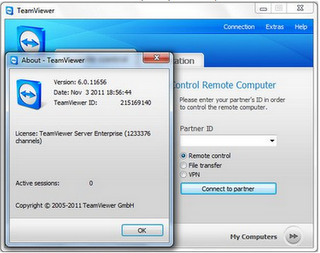
Team Viewer v6.0.9895 Full Version


TeamViewer v6.0.9895 Full Version | sofwergratis will share software called TeamViewer. Team Viewer is a fairly simple program and very easy to use to make access Computer (PC) remotely remotely via the internet. The software is one of the Remote Desktop application.
For Companions sofwergratis who do not know what it is Remote Desktop, here I will give you understanding. The Remote Desktop is: a term that describes where a single computer, a computer that can be controlled by using other media such as the Internet computer network.
Usability Team viewer:
The usefulness of this program is that if we are in a time where we lag of a file, then we could take these files via Team Viewer with file transfer facilities. With a record of the destination computer and the computer is held each has Team Viewer already installed. So also for us who often do support the office computer problems can also use this program. From the remote control facility can help computer users difficulty in software or setting issue that is still in the scope of software (OS, Office Applications, Settings, etc.). Or when we are outside the city but suddenly one of the staff we wanted some files but must be described or presented, then with the remote desktop facility, chat, and also transfer the file we will be facilitated by it all.
Screenshot :


Here are the steps to use Team Viewer as a Remote Computer software remotely :

Download Team Viewer Software If you are not yet able to download it.
Perform installation by following the commands.
Open the program, you will see two sections. In the "Wait for session" underneath are ID and Password. If you have not seen her friend Haramain software, the sign was a test program to determine the connection and computer IDs and passwords for the computer to be able to associate diremote by other computers. If it appears the number, then that "identity" you (your computer). Then on the right called "Create Session", the box is filled to the connection to the remote computer. Do the same on the other computer. Well, here you specify which computers are used as a remote and which functioned as a remoter. Remoter computers are being used to control computers that will diremote.
Now just enter the computer ID will diremote on the "Create Session". I mengamsusikan fellow colleagues already know the ID and password of your remote computer. Then at the bottom, specify specify four options. Is Remote support, Presentation, File transfer, or VPN. Then click the Connect to Partner.
Enter the password that will be our remote computer.
And you have Ready To Use
Download :
Downlad TeamViewer + Crack ( indowebster 7 MB )
Password indowebster: bluesoftware

Saturday, October 27, 2012

WinZip 15 Compression


WinZip is a proprietary file archiver and compressor for Microsoft Windows and Mac OS X, developed by WinZip Computing (formerly Nico Mak Computing). By default, WinZip creates archives in the ZIP file format but also has various levels of support for other archive formats.


screenshot:

Features
Creation of, addition to, and extraction from ZIP archives.
Configurable Microsoft Windows Shell integration
Direct write of ZIP archives to CD/DVD
Decoding of .b64, .hqx, .uue formats.
Automation of backup jobs
Integrated FTP upload
Email ZIP archives
Decompression of following archive formats: .bz2, .rar, LHA/LZH (native in 11.2), 7z (12.0).
Support for ARC and ARJ archives if suitable external programs are installed.

Supported .ZIP archive features
128- and 256-bit key AES encryption[4] in addition to the less secure PKZIP 2.0 encryption method used in earlier versions. The AES implementation, using Brian Gladman's code, was FIPS-197 certified, on March 27, 2003.[5] However, Central Directory Encryption feature is not supported. [6]
Beginning with WinZip 9.0, ZIP64 archives are supported, eliminating both the maximum limit of 65,535 members for single archive and the 4-gibibyte size limit on either the archive and each member file.
Support of additional compression methods: bzip2 (9.0), PPMd (10.0), WavPack (11.0), LZMA (12.0), JPEG (12.0).
Unicode support to ensure international characters are displayed for filenames in a Zip file. (WinZip prior to 11.2 does not support Unicode characters in filenames.[7][8] Attempting to add these files to an archive results in the error message "Warning: Could not open for reading: ...")

WinZip product range
WinZip: Windows archiver.
WinZip Mac Edition: Mac OS X archiver.
WinZip for Android: Android archiver.
WinZip for iOS: iOS archiver.
WinZip E-Mail Companion: Automatically zips all files attached to an outgoing e-mail. Replaced by WinZip Courier.
WinZip Courier: Automatically zips all files attached to an outgoing e-mail. Supported e-mail clients include Microsoft Outlook, Outlook Express, Windows Mail, Gmail and Hotmail.
WinZip Self-Extractor: It adds self-extracting modules to ZIP archives. A version called WinZip Self-Extractor Personal Edition is included with WinZip.
WinZip Command Line Add-on: It adds command line processing to WinZip.
WinZip System Utilities Suite: System optimizer.
WinZip Registry Optimizer: Windows registry cleaner/optimizer.
WinZip Driver Updater: Windows device driver manager and updater.


Download WinZip 15
Password: blue-software.blogspot.com

Wednesday, October 24, 2012

Home Plan PRO 5.2.26.1


Home Plan PRO 5.2.26.1 | Home Plan Pro is designed to quickly and easily draw high quality floor plans, site plans, and architectural designs. Home Plan Pro provides a full array of graphic tool buttons to let you easily pick a tool or action. Once you choose a tool, Home Plan Pro tells you how to use it. You may use the mouse or keyboard, or both, to create your plan.Home Plan Pro gives you many choices for printing your plans. You may select a specific scale, or elect to have your plan printed at the largest size that will fit on the paper you select. While there are a number of impressive and powerful CAD programs available, they are more difficult to learn and use than Home Plan Pro. To preserve its intuitive ease of use and low cost, Home Plan Pro is not designed to compete with full-fledged CAD programs.
SCREENSHOT :


Features
Home Plan Pro includes the home design tools you need:
Easily draw arcs, rectangles, circles, lines, and so forth.
Use the mouse, keyboard, or a combination of both.
Add scaled dimensions with two clicks.
Insert doors and windows with equal ease.
Zoom in or out with a click to work on detailed parts of the plan or to see the whole of it.
Create Layers that you can make invisible or visible at a click
Draw a plot plan using metes & bounds. Calculate the area and acreage.


Sunday, October 21, 2012

Game Protector 1.0


Game Protector is a software that serves to lock the files that extention. EXE I have used this software to protect game PES 2012, so when people open the game, it will automatically be prompted for a password.
Fun is not, as such, only we who know the password are able to open  the application.

Screenshot :


Download Link
Password : click4download

BoneLab 2 v2.3.36 Full Version


BoneLab 2 v2.3.36 Full Version | Is an educational software that can help you learn and know the bone structure of the human body. With BoneLab 2 v2.3.36 full version you can find the form and name of the existing bone in the human body and for more complete information about the bones, we have provided the key to get to Wikipedia, Youtube, etc.. associated with that section.
Screenshot :


TwistedBrush Open Studio


TwistedBrush Open Studio | The application program is designed for those who love the manufacture or manipulate the images / photographs with a touch of the brush, so as to produce a digital image art that is more 'art'.
Screenshot :


TwistedBrush Open Studio is a digital art program applications that prefer the use of the brush feature to create or manipulate images / photos. This free program has a myriad of 'tools' brush to produce digital art.

Some of the features provided, such as layers, realistic media, photo cloning, tracing, masks, particles, filters, script recording, scripts to AVI, drawing tablet support, brush shapes, patterns, textures, integrated scanner support, image brushes, drawing guides , reference image views, dirty brushes, scratch layer, dynamic palettes and much more.

With this application you can generate different types of images, including natural media fine art, photo retouching, mandala art, patterns, manga, photo composition, photo cloning, even the concept of 3D images, and support for flash file format.

Link Download:

Wednesday, October 17, 2012

Media Player Classic Home Cinema 1.6


Media Player Classic Home Cinema 1.6 | Media Player Classic Home Cinema is a video player software that spelled is not new anymore, but it worked wonderfully player. How not exceptional when other players are not able to open the files - video files, instantly I was immediately surprised that players were able to open the file.
Therefore, you are a maniac for the movie - a movie, then you need to have the software to play the file - many movie files saved in a variety of types.


Screnshoot :

Download Link

Tuesday, October 16, 2012

KVIS Refocus v.2.0 Multilingual and Trial Reseter


KVIS Refocus v.2.0 Multilingual and Trial Reseter | Many times when we take pictures using a digital camera shots with the composition of the result is very interesting, but the detail drawing that produced no clear and very blur / blur. Because time may not be played back and Momennya place just like that, would re-do the composition is highly unlikely. So is there a solution? how? Of course there is a solution that is by using software to fix it, and refocus v2.0 AKVIS is one of them. This software can improve the sharpness of image blur, and allows us to increase the sharpness in a particular area is also obscured in any part of the other. Its use is easy and can be done by anyone, even a novice photographer once.

Screenshot

(if the difference between two pictures above do not seem obvious, its Image Zoom to see more clearly the differences of the two images above)

What's New ?
Added compatibility of the plugin with Adobe Photoshop CS6 and Photoshop Elements 11.
Improved compatibility of the plugin with Corel PSP X4.
Fixed bug when working with certain color profiles.
Improved RAW processing.
Added support for images from Sony cameras SLT-A35, SLT-A65V, NEX-5N, and Panasonic camera DMC-GX1.
Improved the Print dialog (when no printers are installed).
Fixed the EXIF error when saving JPEG.
Fixed some minor bugs. 


ActiveFax Server v4.31 Build 0225


ActiveFax Server v4.31 Build 0225 | Fax machine is a replacement software that allows you to receive, send and forward fax messages via email. ActiveFax Server will automatically detect and configure the hardware on your pc, and after installation of the fax server is ready to be operated. In addition ActiveFax Server can be installed many modems at once, that can also handle a lot of fax line as well.

Screenshot


Features
Terminal Server and Citrix support
Complete client/server architecture
Centralized data storage on the fax server
Data access from every workplace in the network
Sophisticated user, group and security concept
Support of all common fax modems (fax class 1, 1.0, 2 and 2.0), ISDN adapters and Brooktrout/Cantata and Intel/Dialogic fax boards (list of recommended modems)
Support of V.34 Fax (Super G3) for transfer rates of up to 33,600 bps
Support of VoIP/FoIP (Voice over IP/Fax over IP) with Eicon "Diva Server SoftIP" software
Unlimited number of fax lines (modems)
Free technical support and software updates available for free download
Faxing and emailing from any Windows application through native printer driver
Faxing and emailing from UNIX and Linux through LPD/LPR, FTP, TFTP and RAW-TCP-Port connections as well as import from the file system
Automatic routing of received fax messages with extension numbers (DDI, MSN, DID), station id (CSID) and line routing
Automatic printing of received fax messages and sending reports on different printers per user
Automatic forwarding of fax messages by email, also to multiple email addresses
Automatic export of fax messages
Support of the file formats PDF, Tiff, Multipage Tiff, GIF and BMP for email attachments and document export
Automatic definition of fax parameters (fax number, subject, priority, etc.) for fully automated fax messages from own applications through data fields
Formatting of fax messages from non-Windows operating systems with printer commands of HP-LaserJet (PCL), Epson-LQ, Postscript and PDF
Automatic archiving of fax messages
Central and private phone books
Direct access to Outlook and Exchange address books
Cover pages and overlays
Data exchange with external database tables through ODBC
Fax on Demand server and client (fax polling)
Least Cost Routing and automatic delayed fax transmissions
Email transmission through SMTP with direct Internet connections or RAS dialup connections
Support of HP Digital Sender 9100C and Xerox Workcentre series
Economical utilization of available resources for low hardware requirements
Automatic hardware detection and configuration by the setup program


Requirements
Processor: 80486 / 66 MHz (Pentium / 300 MHz or more recommended)
RAM: 64MB (256 or more recommended)
Free disk space: 80 MB (200 MB or more recommended)


Monday, October 15, 2012

MAGIX Video easy 4 HD v4.0.0.32


MAGIX Video easy 4 HD v4.0.0.32 | Is a versatile video editing software which is very power full in the job edit edit video files. MAGIX Video easy allows you to edit, cut (cut), convert, add text, insert music into the video, optimize picture and sound on your video files and many others. This software also has a versatile addition to a friendly appearance so easy to use by anyone.

Screenshot from Google :
Features

Connection and Introduction Wizard
A practical Wizard will guide you through the program: from connecting the video camera to recording your videos.

Video Editing Wizard
It just doesn't get any easier: Select your video, add text and music, and your movie is finished � including great transitions!

Clearly laid-out user interface with large buttons
The neatly laid out interface includes extra large buttons and is free of confusing icons and unnecessary 

features.
Numerous help functions as video clips
Helpful video clips are available to you directly within the program to explain how the desired function is used.

Export to DVD, YouTube, Facebook and as files
Burn your movies with a menu to DVD, share them online, or save your video clips as files.

Practical project archiving on DVD and hard drive
Projects aren't just securely archived on DVD or your hard drive, they can also be conveniently edited at any time.

Also supports AVHCD camcorders
With MAGIX Video easy 4 HD you can edit and burn your AVCHD recordings directly. Only somewhat more expensive programs offer this otherwise.

Preview monitor
View edits and effects beforehand, without changing the output video.

Image optimization
Customize color, brightness, contrast, saturation, and volume with ease.

Toolbar
Add titles and text, transitions, photos and music with just a click.

Transport control
The start and stop marker can be moved to any desired position to place edits.

What's new in MAGIX Video easy 4 HD?
Audio commentary: Add commentary to a second audio channel in your video with ease.
Speed regulation: The playback speed of your objects can be easily adjusted with a slider - for great effects.
Upload to Facebook�: Created videos may now be uploaded to Facebook� directly from MAGIX Video easy 4 HD.

Export AVCHD to memory cards: Now completed videos can be directly exported to a SD memory cards. This is particularly helpful if you own a Blu-ray player with a SD slot.
Video exports to mobile devices: Completed videos can now be exported to mobile devices such as Android phones and iPhone's/iPod's/iPad's.
Go back step-by-step function: Now you can individually select the changes which should be undone. This gives you more control of your project.

Saturday, October 13, 2012

PC Optimizer Pro 6.2.6.6


 PC Optimizer Pro 6.2.6.6 | Still with software utilities, this time will share sebuat Kumpulan Software Gratis utilities program to maximize the performance of our pc. PC Optimizer Pro 6.2.6.6 Full version allows us to clean up the various problems that can slow PC performance, remove and clean junk files, uninstalling programs, see the system configuration information, backup, and so forth.

Screenshot


Features:
Scan Windows registry to find and fix any incorrect or obsolete information
Protect your privacy by cleaning up all the tracks of your internet and computer activities
Permanently erases files from your disk without the possibility of them ever being recovered
Uninstall programs from your system
Startup Manager to control what programs run at system startup
Display vital information about the configuration and performance of your system
Backup all your information and crucial files